How Malware Works: The 4 Stages of Infection
Malware relies on a chain of discrete technical steps, meaning you can break the attack at any point by removing a single dependency rather than blocking the entire network.
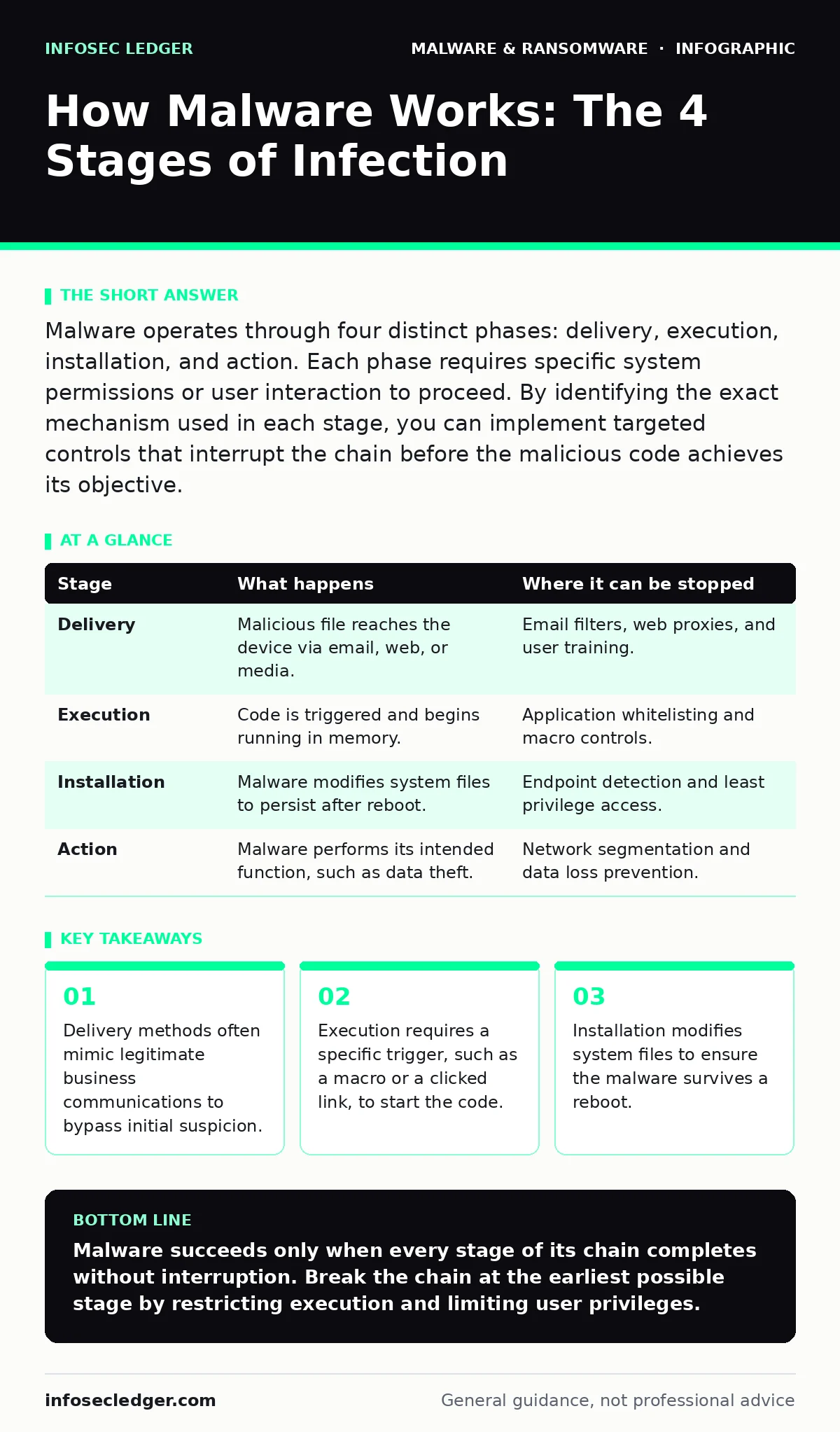
Malware operates through four distinct phases: delivery, execution, installation, and action. Each phase requires specific system permissions or user interaction to proceed. By identifying the exact mechanism used in each stage, you can implement targeted controls that interrupt the chain before the malicious code achieves its objective.
The Anatomy of an Infection
Understanding how malware works requires looking past the final damage. The damage is merely the result of a successful chain of events. If you break any link in that chain, the attack fails. Most defenses focus on the final action, but the weakest points are often earlier in the process. You must understand the mechanics of each stage to build effective controls.
Imagine a thief who needs a key, a window, and a silent alarm to steal a painting. If you reinforce the window, the thief cannot enter. If you remove the key, they cannot open the door. Malware follows a similar logical progression. It does not appear out of nowhere. It arrives, it starts, it stays, and it acts.
Stage 1: Delivery
Delivery is the method by which the malicious code reaches your system. The attacker must get the file onto your device or network. Common vectors include email attachments, compromised websites, or removable media. The goal is not yet to infect, but to place the payload within reach.
Email remains the primary delivery channel. Attackers craft messages that look like routine business correspondence. They use familiar names, urgent deadlines, or internal policy updates to encourage action. The attachment might be a document, a spreadsheet, or a compressed archive. The file itself is harmless until opened. The deception lies in the context, not the file format.
Another delivery method is drive-by downloads. These occur when you visit a compromised website. The site exploits a vulnerability in your browser or operating system. The malware downloads automatically in the background. You do not click anything. You do not open a file. The mere act of loading the page is enough to deliver the payload. This makes web hygiene as important as email hygiene.
| Stage | What happens | Where it can be stopped |
|---|---|---|
| Delivery | Malicious file reaches the device via email, web, or media. | Email filters, web proxies, and user training. |
| Execution | Code is triggered and begins running in memory. | Application whitelisting and macro controls. |
| Installation | Malware modifies system files to persist after reboot. | Endpoint detection and least privilege access. |
| Action | Malware performs its intended function, such as data theft. | Network segmentation and data loss prevention. |
Stage 2: Execution
Delivery places the file on the system. Execution starts the code. Most malware cannot run itself. It needs a trigger. This is often a human action. You open the document. You click the link. You run the installer. The trigger hands control from the operating system to the malicious process.
Some malware uses exploits to achieve execution without user interaction. An exploit takes advantage of a bug in software. If your software is outdated, the bug may exist. The exploit code runs automatically when the vulnerable software processes the malicious input. This is why patching is critical. It removes the bug that allows silent execution.
Stage 3: Installation
Once executed, the malware needs to stay. If you restart the computer, the code in memory disappears. Installation ensures persistence. The malware writes itself to the hard drive. It modifies system settings to run at startup. It may hide its files or processes.
This stage often requires administrative privileges. If your user account has limited rights, the malware may fail to install. This is the power of least privilege. By restricting what standard users can do, you prevent many infections from establishing a foothold. Even if the code runs, it cannot modify the system. It dies with the session.
Some malware uses rootkits to hide. A rootkit is a type of software that provides unauthorized access to a computer while hiding its presence. It intercepts system calls. When you look for files, the rootkit lies to the operating system. It says the file does not exist. This makes detection difficult. Standard antivirus scans may miss it because the file is hidden from the scanner.
Stage 4: Action
The final stage is the action. This is what the malware was designed to do. The action depends on the type of malware. Some steal data. Some encrypt files. Some turn your computer into part of a botnet. The action is the reason the attacker launched the attack.
For ransomware, the action is encryption. The malware locks your files and demands payment. For spyware, the action is surveillance. It records keystrokes or takes screenshots. For cryptojacking, the action is mining cryptocurrency using your resources. Understanding the action helps you prioritize defenses. If you protect your data, you mitigate the impact of encryption. If you monitor network traffic, you spot the mining activity.
See also: Double Extortion Ransomware Prevention Checklist for Business Continuity · Ransomware Attack Chain: Map Stages to Stop Infection
Reading the Attack Chain
You can read an attack chain like a recipe. Each ingredient is a stage. Each step is a requirement. If one step fails, the recipe fails. Look at your security tools. Do they cover all stages? If you only scan for viruses, you miss the delivery and execution stages. If you only monitor network traffic, you miss the installation stage.
Apply this framework to your incident response. When an infection occurs, ask which stage succeeded. Was the email blocked? Was the macro disabled? Was the patch applied? Finding the gap tells you where to improve. Do not just clean the infection. Fix the hole that allowed it in.
Common Misconceptions
Many believe that antivirus software stops all malware. It does not. Antivirus relies on signatures. It knows what known malware looks like. New malware, or polymorphic malware that changes its code, may not have a signature. Antivirus is a net, not a wall. You need other layers to catch what slips through.
Another misconception is that firewalls stop malware. Firewalls control network traffic. They do not stop a user from opening a malicious file on their desktop. They do not stop a macro from running in a local document. Firewalls are useful for blocking command-and-control traffic in the action stage. They are less useful for the delivery and execution stages.
Integrating Other Defenses
Malware is often part of a larger attack. Understanding how it works helps you see the bigger picture. For instance, ransomware attack chain guides detail how attackers move laterally after initial infection. Browser hijackers may deliver malware through malicious extensions. Double extortion ransomware adds data theft to encryption, increasing pressure.
Scareware is a form of social engineering that mimics malware warnings. It tricks users into installing real malware. Rootkits complicate removal by hiding from standard tools. Web shells allow remote access to web servers, often used to deploy malware. SEO poisoning uses search results to deliver malicious links. Cryptojacking uses system resources for profit. Each of these interacts with the core malware stages.
Practical Application
Start by mapping your critical assets. Identify where data lives. Identify who can access it. Then map the malware stages to those assets. Where can delivery occur? Email, web, USB. Where can execution occur? Desktops, servers, mobile devices. Where can installation occur? Any system with admin rights. Where can action occur? Any system with data.
Implement controls for each stage. Use email filtering for delivery. Use application control for execution. Use least privilege for installation. Use data loss prevention for action. Test these controls regularly. Assume that some malware will get through. Your goal is to limit the damage.
Key takeaways
- Delivery methods often mimic legitimate business communications to bypass initial suspicion.
- Execution requires a specific trigger, such as a macro or a clicked link, to start the code.
- Installation modifies system files to ensure the malware survives a reboot.
- Action performs the final goal, such as data theft or system disruption.
Malware succeeds only when every stage of its chain completes without interruption. Break the chain at the earliest possible stage by restricting execution and limiting user privileges.
Frequently asked questions
Can antivirus software stop all malware infections?
No. Antivirus relies on known signatures and often misses new or modified code. It is one layer of defense, not a complete solution. You need additional controls like application whitelisting and network monitoring.
How do I know if my system has a rootkit?
Rootkits are designed to hide. Standard scans may not detect them. Use specialized rootkit removal tools or boot from a trusted external drive to scan the system. Look for unusual system behavior or hidden files.
What is the difference between malware and ransomware?
Malware is a broad term for any malicious software. Ransomware is a specific type of malware that encrypts data and demands payment. All ransomware is malware, but not all malware is ransomware.
Why is patching important for malware prevention?
Patches fix vulnerabilities in software. Many malware attacks exploit these vulnerabilities to achieve execution or installation. Keeping software up to date removes the entry points that attackers use to bypass security controls.
How this guide was produced: written by the InfoSec Ledger editorial team with AI assistance, checked against the public references listed below, and reviewed when the facts change. See our editorial policy or report an error.