How Scareware Works: The Psychological Trap Step by Step
Scareware bypasses technical defenses by exploiting human fear, using fake system alerts to force immediate action before logic can intervene.
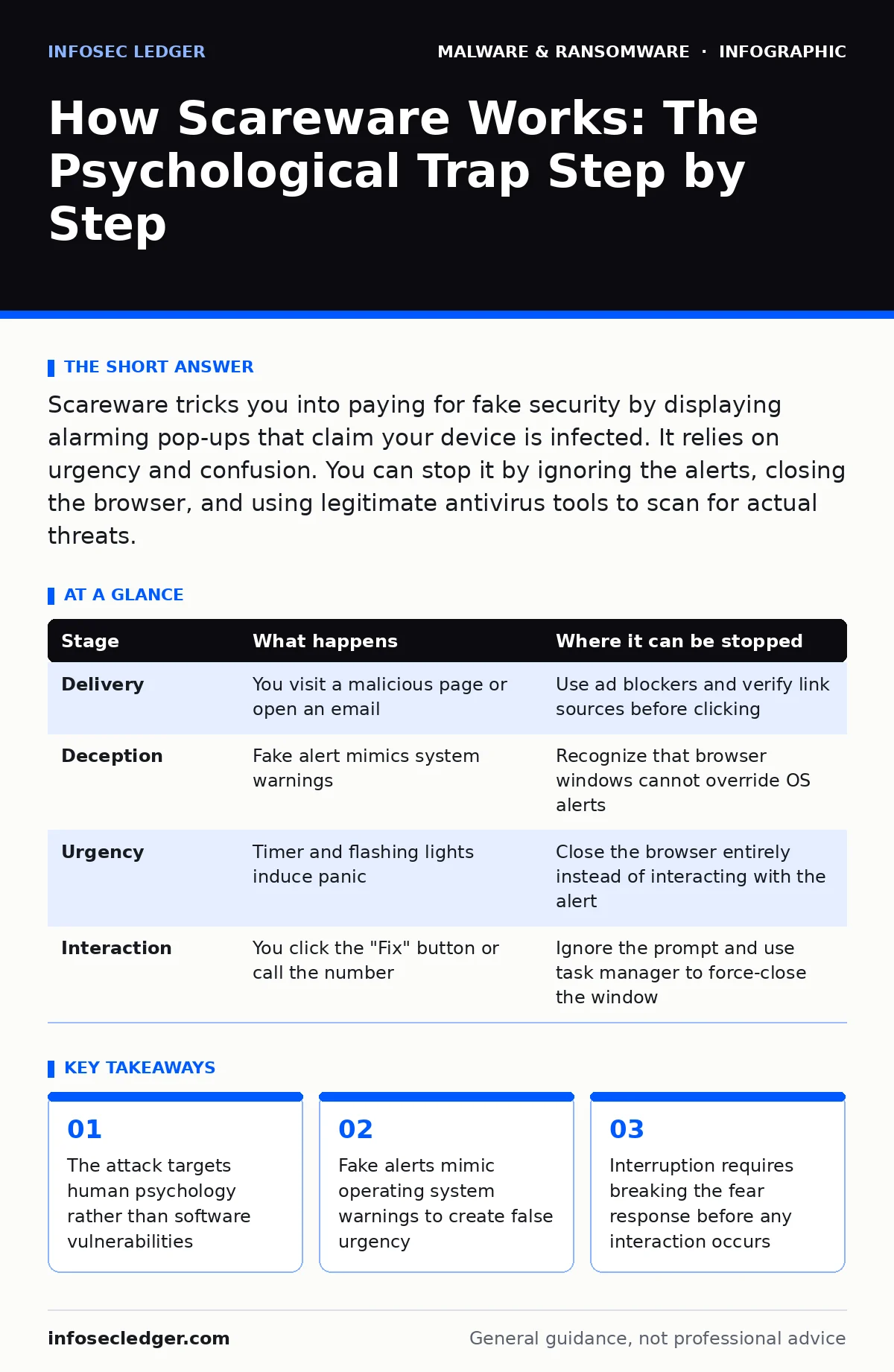
Scareware tricks you into paying for fake security by displaying alarming pop-ups that claim your device is infected. It relies on urgency and confusion. You can stop it by ignoring the alerts, closing the browser, and using legitimate antivirus tools to scan for actual threats.
The Anatomy of a Psychological Attack
Scareware operates on a simple premise: fear drives faster decisions than logic. You see a flashing red alert claiming your computer is compromised. The message demands immediate payment or installation of a "fix." This is not a technical exploit in the traditional sense. It is a social engineering attack packaged as a technical emergency.
The attacker relies on your assumption that system warnings are authoritative. Modern operating systems use specific visual cues for errors. Scareware mimics these cues. It uses the same colors, fonts, and urgent language. Your brain registers the threat as real before your critical thinking can analyze the source. This delay is the window the attacker needs.
### Stage 1: The Delivery Vector
The encounter usually begins with a web page or an email link. The attacker does not need to hack your network to start this process. They only need to get you to visit a site or open an attachment. The delivery method is often disguised as something useful or urgent.
Imagine clicking a link that promises a free download or an important invoice. The page loads normally at first. Then, a script triggers a pop-up window. This window is the payload. It is not a file downloading to your hard drive yet. It is a visual overlay designed to look like it is coming from your operating system.
### Stage 2: The Visual Deception
The pop-up window is crafted to bypass your skepticism. It displays a fake logo of a well-known security vendor or operating system. It lists fabricated threats, such as "Trojan detected" or "Personal data exposed." The interface includes spinning wheels and countdown timers.
This stage exploits the authority bias. You trust the blue checkmark or the shield icon. You assume the text is generated by your computer, not a website. The attacker leverages this trust to create a sense of shared reality. The flaw here is in your perception, not in your code. The window looks native because it uses standard web technologies styled to mimic native applications.
### Stage 3: The Urgency Loop
Once the visual deception is in place, the attack escalates the pressure. The alert changes color or flashes. A timer counts down, suggesting that failure to act will result in permanent data loss. The message may state that your computer will shut down in five minutes.
This is the critical psychological pressure point. The goal is to induce panic. Panic reduces your ability to evaluate options. You stop looking for alternative explanations. You focus solely on the immediate relief offered by the attacker. The urgency is artificial, but the fear is real. This is where the attack succeeds or fails.
### Stage 4: The Interaction Trap
The attacker provides a clear path to "resolve" the issue. This is usually a button labeled "Fix Now," "Clean PC," or "Call Support." Clicking this button is the primary goal. It may download a fake antivirus program. It may redirect you to a phishing site to enter credit card details. It may initiate a phone call to a scam center.
Some variants do not require a click. They may open a new tab that cannot be closed easily. They may trigger a full-screen mode that hides the browser controls. This makes it difficult for you to access your task manager or close the window. The interaction trap is designed to maximize confusion and minimize your ability to exit the scenario safely.
See also: Browser Hijackers: How They Bypass Defenses and Steal Data · Cryptojacking Warning Signs: Detect Hidden Mining Before It Costs You
### Stage 5: The Exploitation
If you interact with the alert, the exploitation begins. You might pay for a service that does not exist. You might install software that steals your passwords. You might give a remote support agent access to your files. In some cases, the "fix" installs a rootkit, a type of malware that hides its presence deep in the system.
The financial loss is immediate. The data loss may be delayed. The attacker has converted your fear into value. The technical damage varies. Some scareware is purely fraudulent, taking your money and doing nothing. Others install persistent threats that require deep cleaning. The distinction is often unclear until after the interaction.
Mapping the Interruption Points
You can disrupt this process at several stages. The earlier you intervene, the less damage occurs. The key is recognizing that the warning is not coming from your system. It is coming from a website or a script. Once you identify the source, the illusion breaks.
| Stage | What happens | Where it can be stopped |
|---|---|---|
| Delivery | You visit a malicious page or open an email | Use ad blockers and verify link sources before clicking |
| Deception | Fake alert mimics system warnings | Recognize that browser windows cannot override OS alerts |
| Urgency | Timer and flashing lights induce panic | Close the browser entirely instead of interacting with the alert |
| Interaction | You click the "Fix" button or call the number | Ignore the prompt and use task manager to force-close the window |
Breaking the Cycle
The most effective defense against scareware is behavioral, not technical. No firewall can stop a pop-up from displaying if the browser allows it. No antivirus can distinguish a fake alert from a real one in real-time. The protection must come from your response.
When you see an urgent alert, pause. Do not click. Do not call. Close the application that is displaying the alert. If it is a browser, close the browser. If it is a desktop window, use the operating system's task manager to end the process. Then, run a scan with your trusted security software. This routine breaks the psychological hold the attacker has established.
Key takeaways
- The attack targets human psychology rather than software vulnerabilities
- Fake alerts mimic operating system warnings to create false urgency
- Interruption requires breaking the fear response before any interaction occurs
Frequently asked questions
How can I tell if a security alert is real or fake?
Real alerts come from your operating system or installed security software and appear outside the browser. Fake alerts appear inside a web page and often include phone numbers or links to pay.
Does closing the browser stop the malware?
Closing the browser stops the visual scareware from interacting with you. If you already clicked a download, you should run a full system scan to remove any installed files.
Can scareware access my files without me clicking anything?
Scareware itself is just a visual trick. It cannot access your files unless you install a program or grant remote access. The danger is in the subsequent action you take.
Is scareware related to browser hijackers?
Both are unwanted and disruptive. Browser hijackers change your settings to redirect traffic. Scareware uses fake alerts to trick you into paying or installing software. They often overlap in tactics. BOTTOM LINE: Scareware succeeds by exploiting fear, not technical flaws. Pause and close the window before interacting with any urgent alert.
How this guide was produced: written by the InfoSec Ledger editorial team with AI assistance, checked against the public references listed below, and reviewed when the facts change. See our editorial policy or report an error.